Supermarkets and Breadcrumbs
Last updated: March 3, 2026
Diataxis Type: Explanation
Audience: Arda users managing physical inventory
Collection: Help Center / Explanations
Introduction
When techs work from personal toolkits, parts trays, or workbench organizers, they consume small quantities of parts close to where they work. But those small quantities need to come from somewhere, and someone needs to trigger a reorder when bulk stock runs low.
That is the problem supermarkets and breadcrumbs solve. Together, they create a two-layer inventory system that keeps parts flowing without anyone needing to think about procurement until the right moment.
What Is a Supermarket?
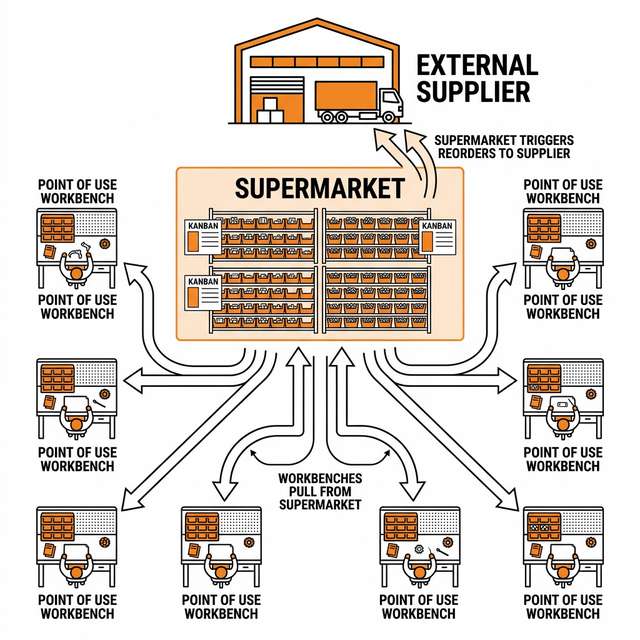
A supermarket is a centralized storage location where bulk quantities of parts are kept, organized, and managed with Kanban cards. The name comes from Taiichi Ohno's original insight at Toyota: he watched American grocery stores restock shelves only as products were purchased, and applied that same "pull" principle to manufacturing.
In practice, a supermarket is a shelf, cage, cabinet, or stockroom area where:
Parts are stored in larger quantities than what fits at a workstation
Each part has a defined minimum quantity and order quantity
An Arda order card is attached at the storage point
The card gets triggered (scanned or dropped in a drop bin) when stock hits the minimum
Supermarket overview: workbenches pull from a central supermarket, which triggers reorders to external suppliers
What Is a Breadcrumb?
A breadcrumb is a small label placed at the point of use that tells the tech where to go for more stock. It is a pointer from the toolbox to the supermarket.
In Arda, breadcrumbs are printed labels that include the part name, a part image, the SKU, and a QR code. You stick them on the tray lid, inside the toolbox, or on the bin edge -- anywhere the tech will see it when they run low.
An Arda breadcrumb label for a Screw Stud 5/8 -- shows the part name, assembly, SKU, QR code, and part image
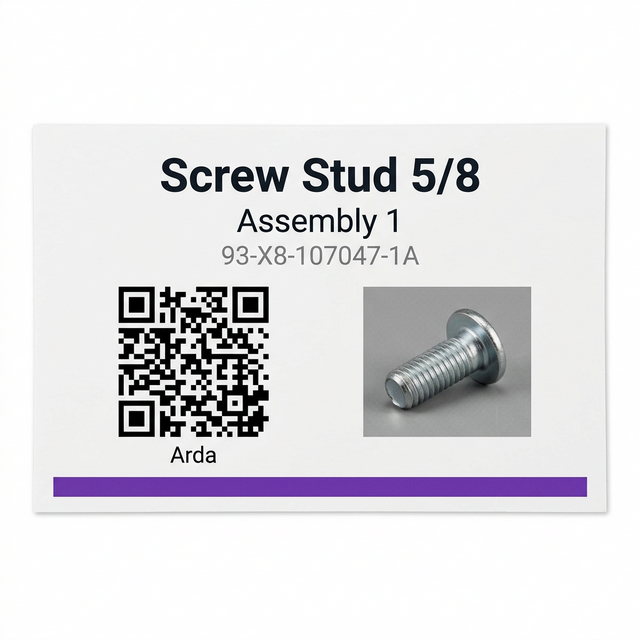
The breadcrumb answers one question: "I need more of this part. Where do I go?" The tech scans the QR code or reads the label, and it points them to the supermarket location where that part is stocked in bulk.
A Real-World Example
Here is a typical point-of-use setup: a tech's parts tray at their workbench, holding small working quantities of screws, housings, gaskets, and other parts they consume during jobs.
A tech's parts organizer tray at their workbench, holding small working quantities of various parts
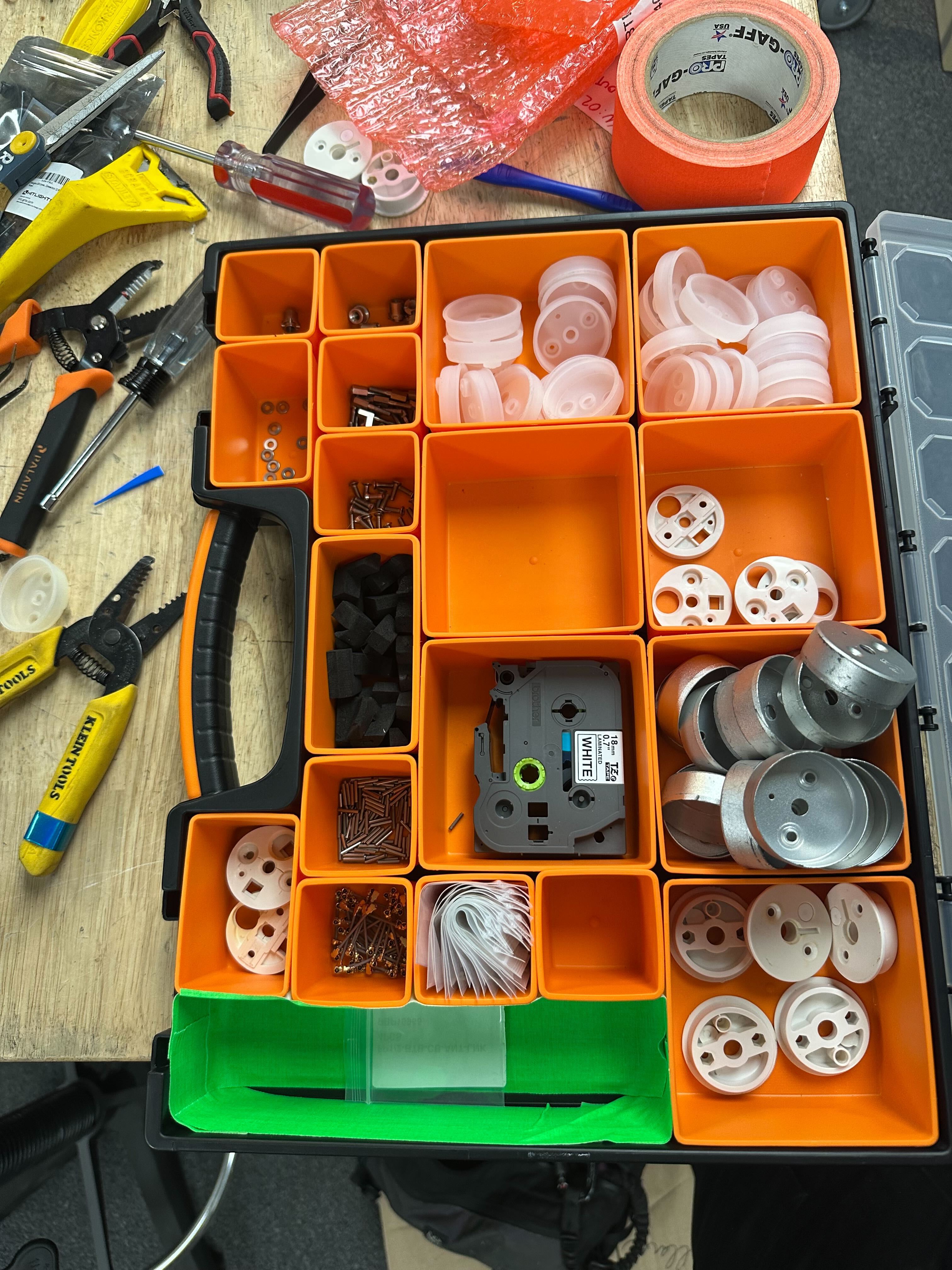
This tray is not the inventory system. It holds a small working quantity only. The tech keeps a useful amout of each part they regularly use that fits in the tray. Breadcrumb labels on the tray lid tell them where to go when a compartment runs low.
Walking Through the Screw Stud Example
Let's say a tech keeps 10 Screw Studs 5/8 in their toolbox. At the supermarket shelf, you have a two-bin system set up like this:
ParameterValue | |
Toolbox quantity | 10 units |
Max supermarket stock | 100 units |
Minimum quantity (reorder point) | 50 units |
Order quantity | 50 units |
Bins at supermarket | 2 (each holds 50) |
Consumption during procurement | ~10 units |
Here is what happens:
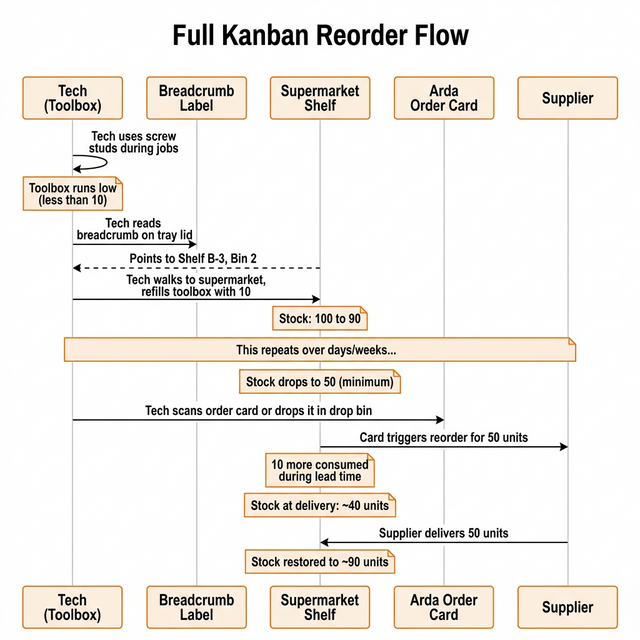
Full Kanban reorder flow: from toolbox to breadcrumb to supermarket to order card to supplier
Step by Step
Tech works from their toolbox. They pull Screw Studs 5/8 as needed for jobs. The toolbox holds about 10.
Toolbox runs low. The tech sees they are down to a few studs.
Tech reads the breadcrumb. The Arda breadcrumb label on the tray lid shows "Screw Stud 5/8 -- Assembly 1" with a QR code and part image. It points to the supermarket.
Tech walks to the supermarket. They find Shelf B-3, Bin 2, grab 10 studs, and refill their toolbox.
This repeats. Multiple techs do the same thing over days and weeks, drawing the supermarket down toward the minimum.
Supermarket hits minimum (50 units). The next tech who restocks and sees the stock at or below 50 scans the Arda order card at the shelf or drops it in the drop bin.
Arda triggers the reorder. 50 units are ordered from the supplier. The card moves into the order queue.
Parts are still consumed during procurement. While waiting for the order to arrive, techs keep pulling from the remaining stock. About 10 more are consumed, bringing the shelf down to ~40.
Supplier delivers. 50 units arrive. Stock goes back up to ~90.
Important
The minimum quantity (50) is set above the amount you expect to consume during procurement lead time (10). This buffer is what prevents a stockout. If your lead time is longer or consumption is higher, raise the minimum accordingly.
First In, First Out (FIFO)
When restocking the supermarket shelf after a delivery, always put new stock behind or under the existing stock. This is called FIFO -- first in, first out.
Why it matters:
Parts that have been sitting longest get used first
Prevents old inventory from aging out or deteriorating in the back of the bin
Critical for parts with shelf life, coating degradation, or lot traceability requirements
How to FIFO a Two-Bin Restock
FIFO two-bin restock: older stock stays in front, new delivery goes behind
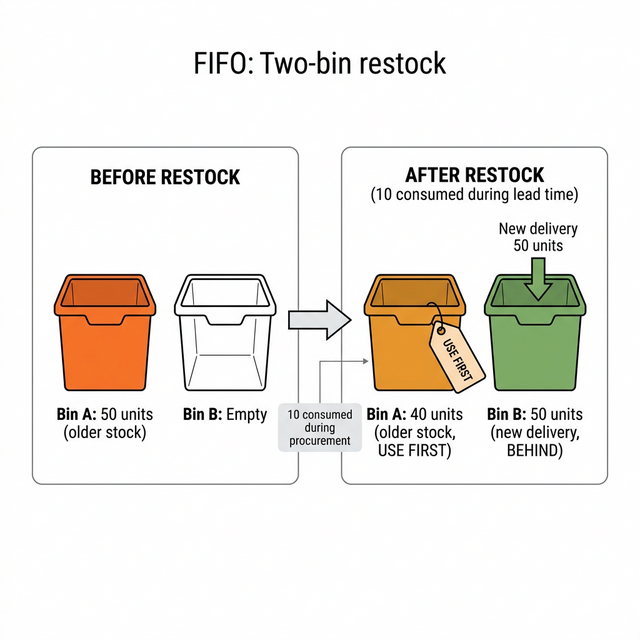
When the tech comes to refill their toolbox, they pull from Bin A first (older stock). Only once Bin A is empty do they move to Bin B. This keeps the rotation clean.
Tip
Mark bins with "USE FIRST" or a colored tag on the active bin. When it empties and gets refilled from a new delivery, move the tag to the other bin.
The Two-Bin System
The two-bin system is the most common supermarket pattern. One bin is "in use" (techs pull from it), the other is the buffer. When the active bin empties and you cross the minimum quantity, the tech scans the order card or drops it in the drop bin.
Two-bin Kanban system flowchart: Bin A empties, triggers scan or drop bin, supplier ships, FIFO restock
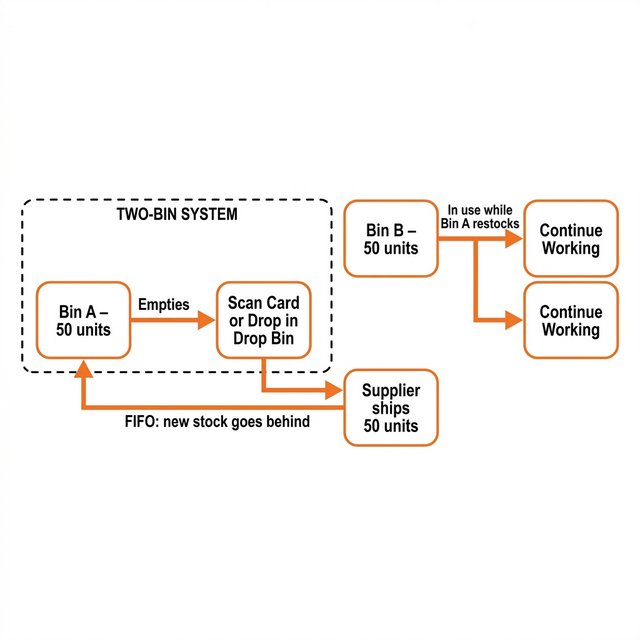
The math is straightforward:
VariableHow to set it | |
Max stock | The most you want on the shelf at any time |
Min quantity | The point where you trigger an order -- must be higher than what you consume during lead time |
Order quantity | Usually max minus min, so one order refills you to max |
Consumption during lead time | Track this over a few cycles and use the average |
How Supermarkets and Breadcrumbs Work Together
Two-bin Kanban system flow: tech takes parts, follows breadcrumb, refills from supermarket, triggers order card at minimum
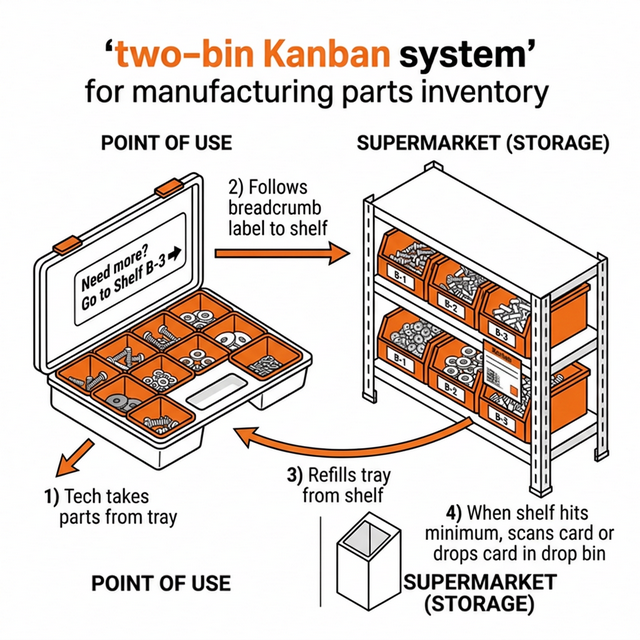
The two concepts form a clean separation of concerns:
LayerWhatWho cares about it | ||
Toolbox (point of use) | Small working quantity, breadcrumb label attached | Tech |
Supermarket (storage) | Bulk stock, order card attached, two-bin system | Tech + Procurement |
Supplier (external) | Fulfills orders triggered by the card | Procurement |
Techs never think about ordering. They follow breadcrumbs. The Kanban system handles the rest.
When to Use This Setup
Supermarkets and breadcrumbs are the right fit when:
ConditionWhy it matters | |
Multiple people use the same parts | Everyone needs a consistent place to restock from |
Parts are consumed at workstations away from bulk storage | You need a pointer (breadcrumb) from the bench to the shelf |
You want one reorder point, not many | The order card lives at the supermarket, not at every toolbox |
Parts are small and cheap enough to hold buffer stock | Two-bin math works best when you can afford 2x min on hand |
Supermarkets are less useful for large, expensive, or infrequently used items. Those are better managed with a single-point Kanban loop where the card sits directly with the part.
Key Takeaways
A supermarket is your centralized, Kanban-managed storage area. It is the one place where order cards live and reorders get triggered.
A breadcrumb is a label at the point of use that says "go here for more." It connects the tech's toolbox to the supermarket shelf.
FIFO matters. Always put new stock behind old stock when restocking bins. Oldest parts get used first.
Set your minimum quantity higher than your expected consumption during lead time. That buffer is what prevents stockouts.
Together, these create a clean separation: techs never think about ordering. They just follow breadcrumbs. The Kanban system handles the rest.