Item Type, Sub Type, and Use-Case Explained
Last updated: January 22, 2026
Context
We often get questions about how to use Item Type and Sub Type fields in Arda. Below we'll discuss
Answer
What are these categories for?
Categories help people find items fast, stock items in the right place, and keep ordering clean (reports, POs, and audits). In Arda, we usually treat “Type / Subtype / Department / Location” as the “shop usage” set of fields that make items easy to manage day to day.
Which categorization should I use?
At Arda, we typically use one of three categorization styles and these can be adjusted based on your industry:
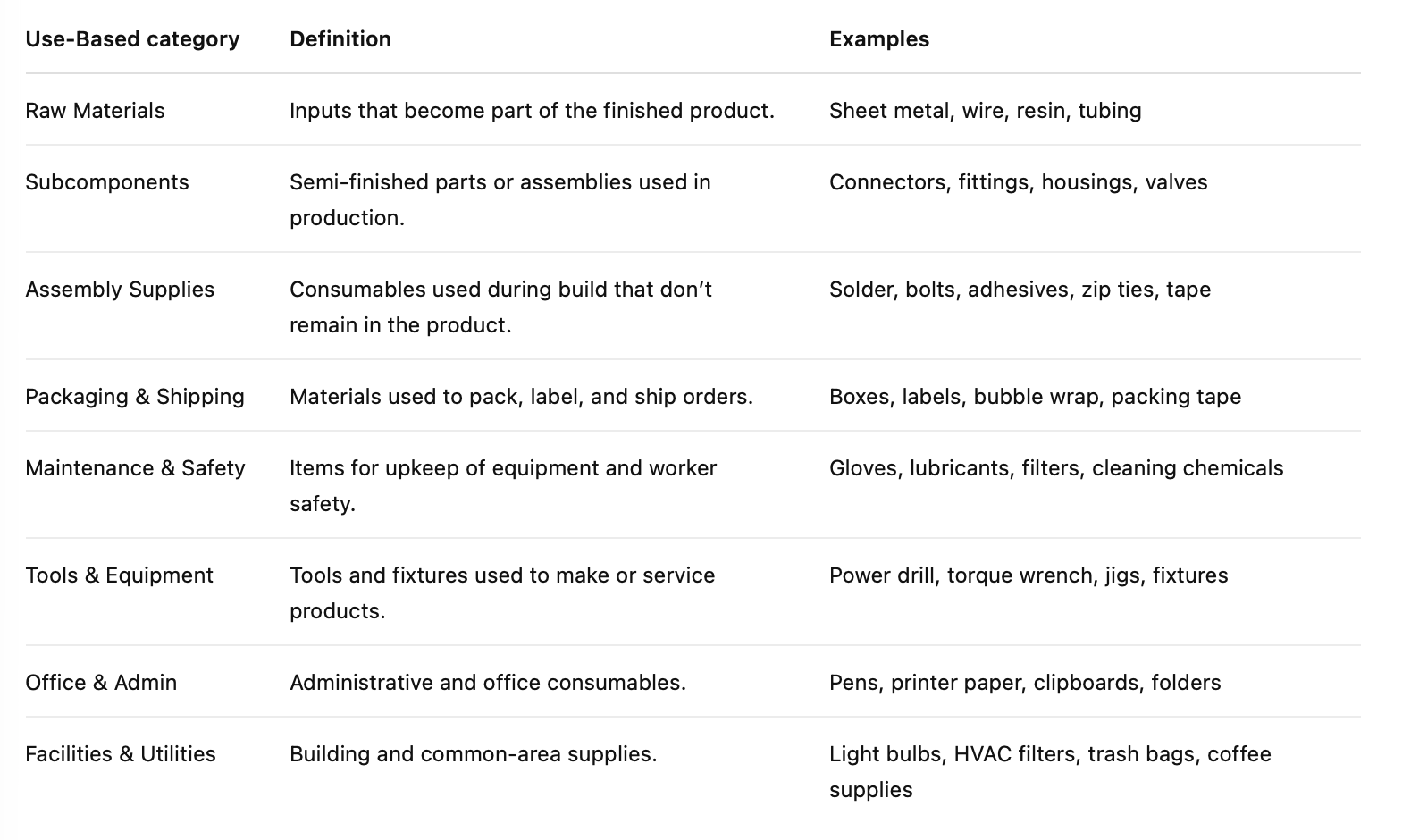
Use-Based: what the item is used for (Raw Materials, Packaging, Safety, etc.).
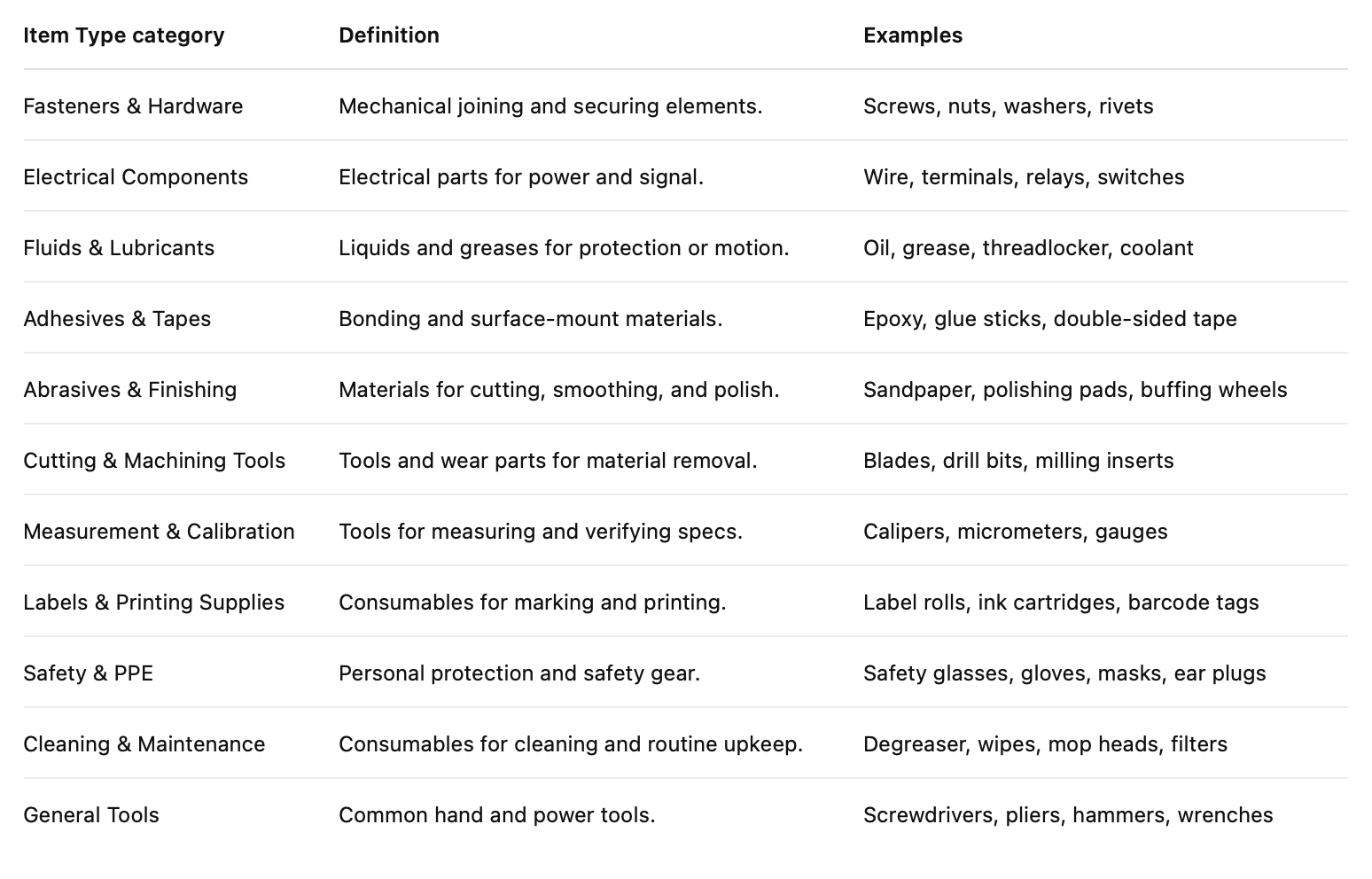
Item Type: what the item is (Fasteners, Electrical, Fluids, etc.).
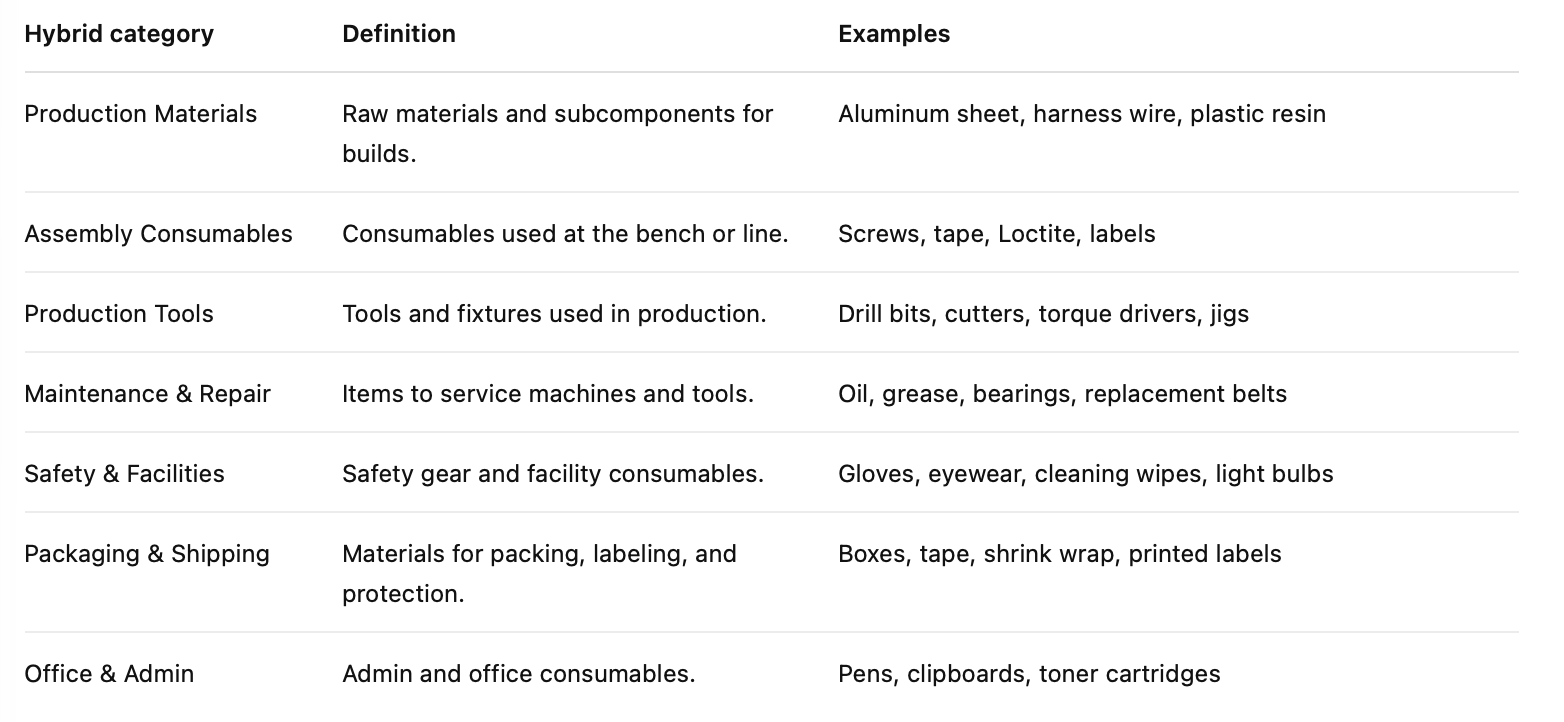
Hybrid: a simplified mix that maps better to how many shops actually work (Production Materials, Assembly Consumables, Maintenance & Repair, etc.).
Default rule at Arda: if it’s unclear, default to Item Type.
Quick decision guide
Use this as a simple “pick one” guide:
Choose Item Type when:
Techs and buyers describe items by what they are (screws, relays, tape, gloves).
You want consistent grouping across departments.
You want categories that stay stable even when processes change.
Choose Use-Based when:
The biggest goal is to separate inventory by workflow: production vs packaging vs maintenance.
Different teams own different spend buckets and you want the category to match that.
Choose Hybrid when:
The customer wants fewer choices and faster training.
They want categories that map to storage zones and replenishment routines (production, maintenance, office).
You want a clean roll-up for reporting without overthinking it.
Do I need both Use-Based and Item Type?
Generally, no.
A practical setup is:
Pick one “primary” categorization for how people search and stock (usually Item Type).
Use Department and Location for ownership and where it lives (this is often more useful than piling on more category schemes).
Add a second categorization only if it solves a real problem (reporting, storage zoning, purchasing split).
How do I create good categories?
1) Start with how people talk
Ask two questions:
“What do you call this when you need it?”
“Where do you go to get it?”
That usually points to Item Type (what it is) plus Location (where it lives).
2) Keep the list short
Aim for:
5–10 top-level categories (max 12)
0–5 subtypes per type
If you have too many categories, people stop using them or get confused about what is what.
3) Write simple rules for edge cases
Examples:
If it’s worn out on the line and replaced often, treat it as a consumable.
If it’s checked out and returned, treat it as a tool.
If it ships with product, treat it as Packaging & Shipping (Use-Based) or Packaging & Shipping (Hybrid).
4) Don’t use categories to solve location problems
Use:
Location / Sub-location for where it sits
Department / Facility for ownership
The bulk import template shows these as separate fields for a reason (location, sub_location, facility, department, type, sub_type).
Best practices (what works in real shops)
Make one field “required in practice”
Even if Arda allows nulls, pick one category field that your team always fills out. Arda’s rule of thumb is to default to Item Type when unclear.
Use color coding for one thing only
Color is powerful but limited. Arda can color-code cards, but it’s limited to seven colors, and you can set it to different drivers (department, item type, use case, etc.).
Pick one meaning for colors and document it.
Separate “finding” from “accounting”
If you need accounting rollups, use a GL code (supported in bulk import) instead of forcing categories to do finance jobs.
Assign an owner
Someone must own:
approving new categories
merging duplicates
running a monthly cleanup
Common Questions
“What if an item fits two categories?”
Pick the category that helps someone find it fastest.
If it still feels 50/50:
Use sub_type as the tie-breaker, or
Put the nuance in the item notes (not the category name).
“Can we change categories later?”
Yes. Just keep these rules:
Don’t rename categories every week.
If you change a category name, document the old → new mapping.
Batch changes are easier through import tools than one-by-one edits. The bulk import tool is designed for this workflow.
“How should we handle vendor part numbers vs internal part numbers?”
Vendor part numbers belong in supplier SKU fields; internal numbers belong in internal SKU fields. This comes up during item setup and prevents search confusion.
“How do we roll this out without boiling the ocean?”
Do it in phases:
Pick the primary scheme (usually Item Type).
Create categories for the top 50–100 items first.
Add the rest over time, and only add new categories when you have at least 5–10 items that need it.
Examples
Here’s how the same item can be categorized depending on what the customer wants:
Solder
Use-Based: Assembly Supplies
Item Type: (depends on their world; often Adhesives & Tapes or Electrical Components, but pick the closest bucket your team uses consistently)
Hybrid: Assembly Consumables
Safety glasses
Use-Based: Maintenance & Safety
Item Type: Safety & PPE
Hybrid: Safety & Facilities
Recommended “default” setup (works for most customers)
Primary categorization: Item Type (keep it consistent)
Ownership: Department (who pays / who uses)
Physical control: Location + Sub-location (where it lives)
Optional rollup: Hybrid (only if they need better reporting or zoning)
Arda Examples
Use Based
Item Type
Hybrid